
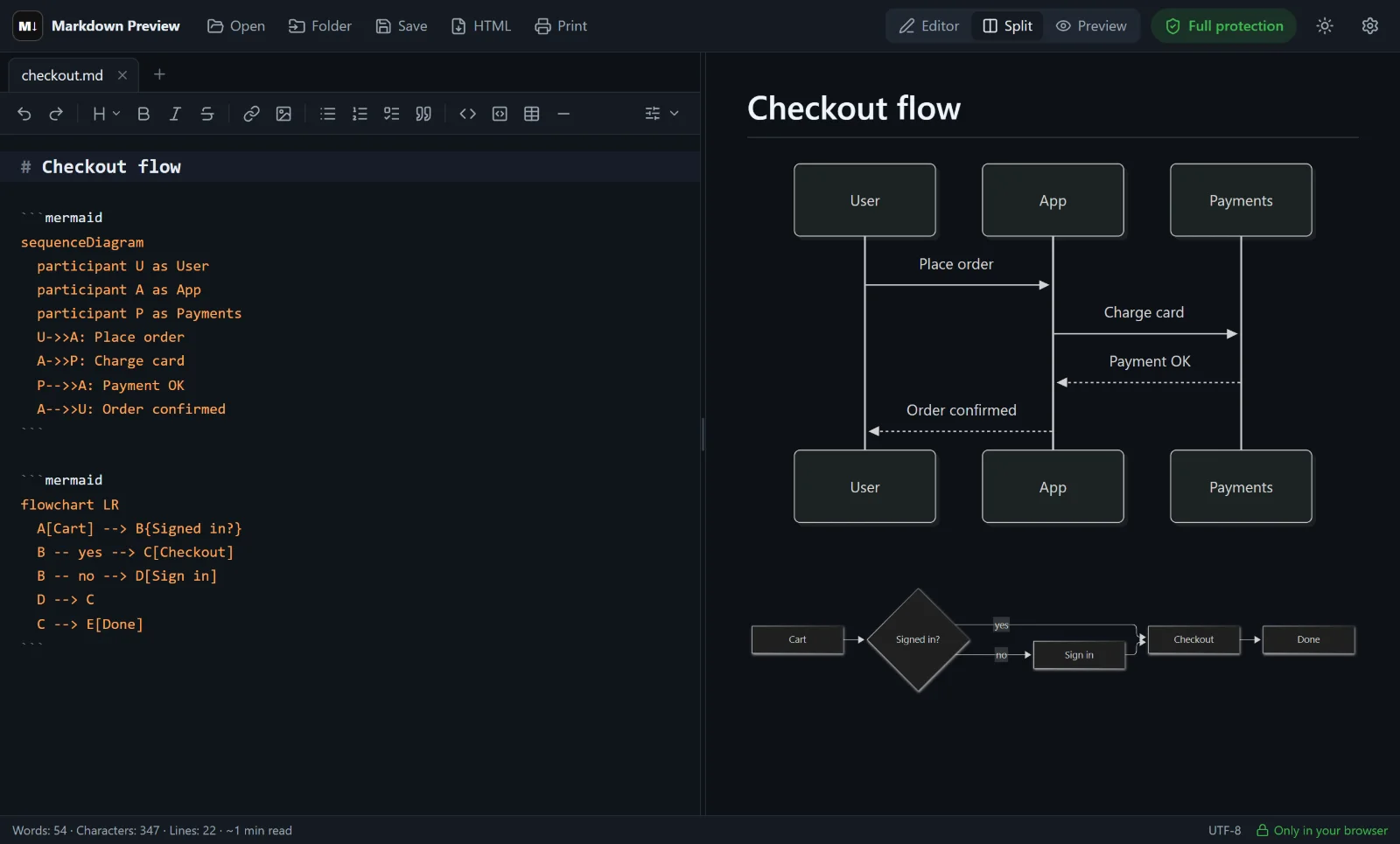
With Mermaid, a few lines of text become a diagram. Markdown Preview Editor works as a Mermaid live editor: type the diagram code in a Markdown document and the preview draws it as you type. Unlike a standalone diagram tool, the diagram lives together with the text around it, so a design document, a README or a lesson plan stays in one file.
What is a Mermaid diagram?
A Mermaid diagram is a chart described in plain text. You don’t drag boxes and arrows — you write lines like A --> B, and Mermaid lays out the picture for you. It supports flowcharts, sequence diagrams, Gantt charts, state and class diagrams, pie charts, mind maps and more.
Being text, a diagram is easy to change, lives in version control and shows up in diffs. GitHub, GitLab, Obsidian and many documentation tools render Mermaid, so the same code works in all of them.
How to draw a diagram
- Open the editor. Go to the online editor.
- Add a Mermaid block. Type three backticks followed by
mermaid, or use the Mermaid diagram button in the Advanced toolbar row to insert a template. - Write the diagram. The preview on the right redraws it while you type, so a missing arrow or bracket is visible immediately.
- Save or share. Save the document as
.md, export it to HTML or print it to PDF — diagrams are included.
Here is a first flowchart:
markdown```mermaid
flowchart LR
  A[Idea] --> B{Worth it?}
  B -- yes --> C[Build it]
  B -- no --> D[Park it]
```
Diagram types you can use
| Type | Starts with | Good for |
|---|---|---|
| Flowchart | flowchart TD / flowchart LR |
Processes, decisions, algorithms |
| Sequence diagram | sequenceDiagram |
APIs, logins, user journeys |
| Gantt chart | gantt |
Project plans and timelines |
| State diagram | stateDiagram-v2 |
Statuses of an order or a document |
| Class diagram | classDiagram |
Data models and code structure |
| Pie chart | pie |
Shares of a total |
The full syntax for each type, with copy-ready examples, is in our guide to Mermaid diagrams in Markdown.
Why use it
- Live preview. The diagram updates while you type; syntax errors show up right away.
- Text and diagrams together. Write the explanation, the formulas and the flowchart in one Markdown file.
- Private. Diagrams are drawn in your browser. Your code is not sent to a server.
- Free and open source. No account, no limits on the number of diagrams.
Limitations
- There is no separate PNG or SVG download for a single diagram. Diagrams are exported as part of the document — in the HTML export and in PDF. For a standalone image, the official Mermaid tools can export one.
- Custom themes and per-node styles are limited: diagrams use a clean default look that matches the light or dark theme.
- Diagrams are written as code; there is no visual drag-and-drop editing.
Want to view an existing Markdown file with diagrams? Use the Markdown viewer, or go back to the Markdown editor home page.
Frequently asked questions
Is this Mermaid live editor free?
Yes. It is free and open source, with no sign-up and no limits.
Which Mermaid diagram types are supported?
Flowcharts, sequence diagrams, Gantt charts, state, class and entity-relationship diagrams, pie charts, mind maps, timelines and the other types Mermaid supports.
Can I export a Mermaid diagram?
Diagrams are included when you export the document to HTML or print it to PDF. A separate PNG or SVG download for one diagram is not available.
Why does my Mermaid diagram not render?
Most often it is a syntax error: a missing arrow, an unclosed bracket or special characters in an unquoted label. The first line must name the diagram type, such as flowchart TD.
Does the editor send my diagram code anywhere?
No. The diagram is drawn in your browser, and the document stays on your device.